|
Service Item Setup |
  
|
|
Service Item Setup |
|
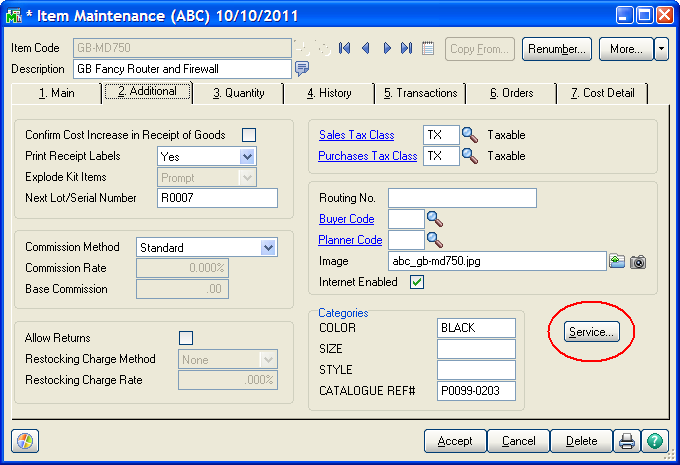
A new button has been added to the Additional panel in Item Maintenance and Item Inquiry. If you want a new service item to be created each time this item is sold, click this button and set up the default service item creation fields as shown below.
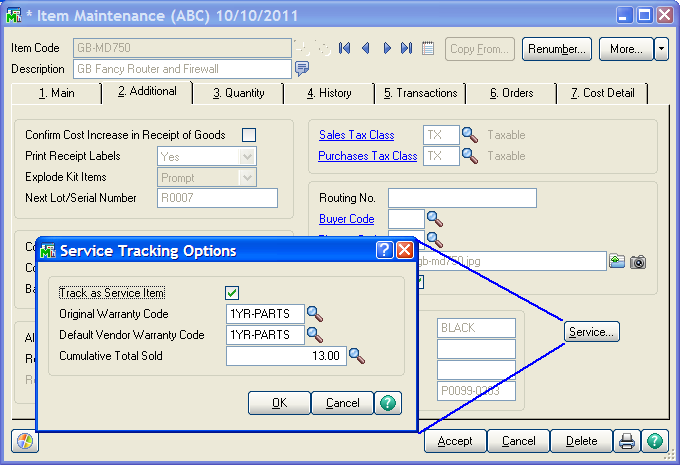
Track as Service Item - Check this box if you want a service item to be created every time this item is sold through Sales Order order processing and invoicing. For more information about service items, take a look at Service Items.
Original Warranty Code - Select a warranty code to assign to each new service item created automatically when this item is sold.
Default Vendor Warranty Code - Select a warranty code to assign as the vendor warranty on the purchase tab of the service item.
Cumulative Total Sold - Each time one of these items is sold and creates a service item, this counter is incremented.